A Training Pace Calculator That Knows Every Athlete on Your Roster
Six research-backed pace zones, generated automatically from each athlete's VDOT score — shown per mile and per 400m, and updated every time fitness changes. No more guessing what "tempo pace" means for each kid.
Free for 14 days · Cancel anytime
Six Precision Training Zones for Every Athlete
Each zone targets a specific physiological adaptation. TrackCoach360 calculates all six from a single VDOT score, so every athlete trains at the intensity each session is designed for — not too fast on easy days, not too slow on hard ones.
Easy
Recovery & Aerobic
Marathon
Sustained Endurance
Threshold
Lactate Development
CV
Tempo-Interval Bridge
Interval
VO2max Development
Repetition
Speed & Neuromuscular
Want the science behind each zone? Read VDOT training paces, explained.
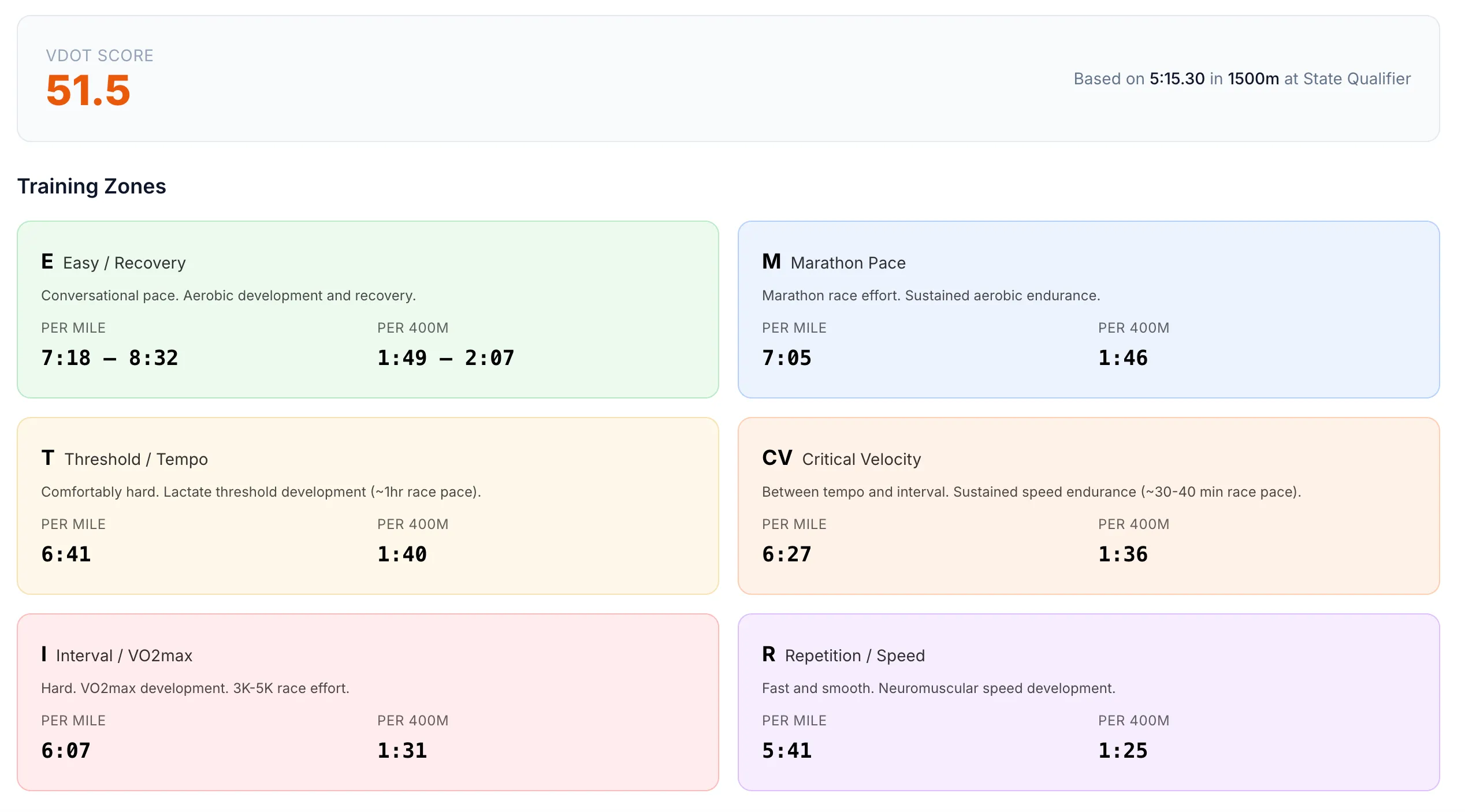
Same Zone, Two Views
Per mile
For road runs, long runs, and continuous tempos
Per 400m
For lap splits you can call out on the track
All six zones show both formats, side by side, for every athlete.
Per Mile for the Roads. Per 400m for the Track.
A pace chart is only useful if it speaks the language of the workout. Every zone in TrackCoach360 shows pace per mile and per 400m, so you can hand an athlete a long run pace on Monday and call out lap splits at Wednesday's interval session — from the same screen.
- No mid-practice mental math converting mile pace to lap splits
- Athletes with a watch get mile pace; athletes on the track get 400m targets
- Pull paces up on your phone at the track — works on any device
Paces That Keep Up With Your Athletes
The biggest problem with printed pace charts is that they're frozen in time. Your athletes aren't. In TrackCoach360, every new race result recalculates the athlete's VDOT — and all six pace zones update with it, automatically.
- PR at Saturday's meet → sharper training paces by Monday's practice
- VDOT comes straight from logged races via the VDOT calculator — no separate data entry
- Mid-season fitness jumps are reflected immediately, so workouts stay appropriately hard
- Current paces flow directly into the workout generator on the Complete plan
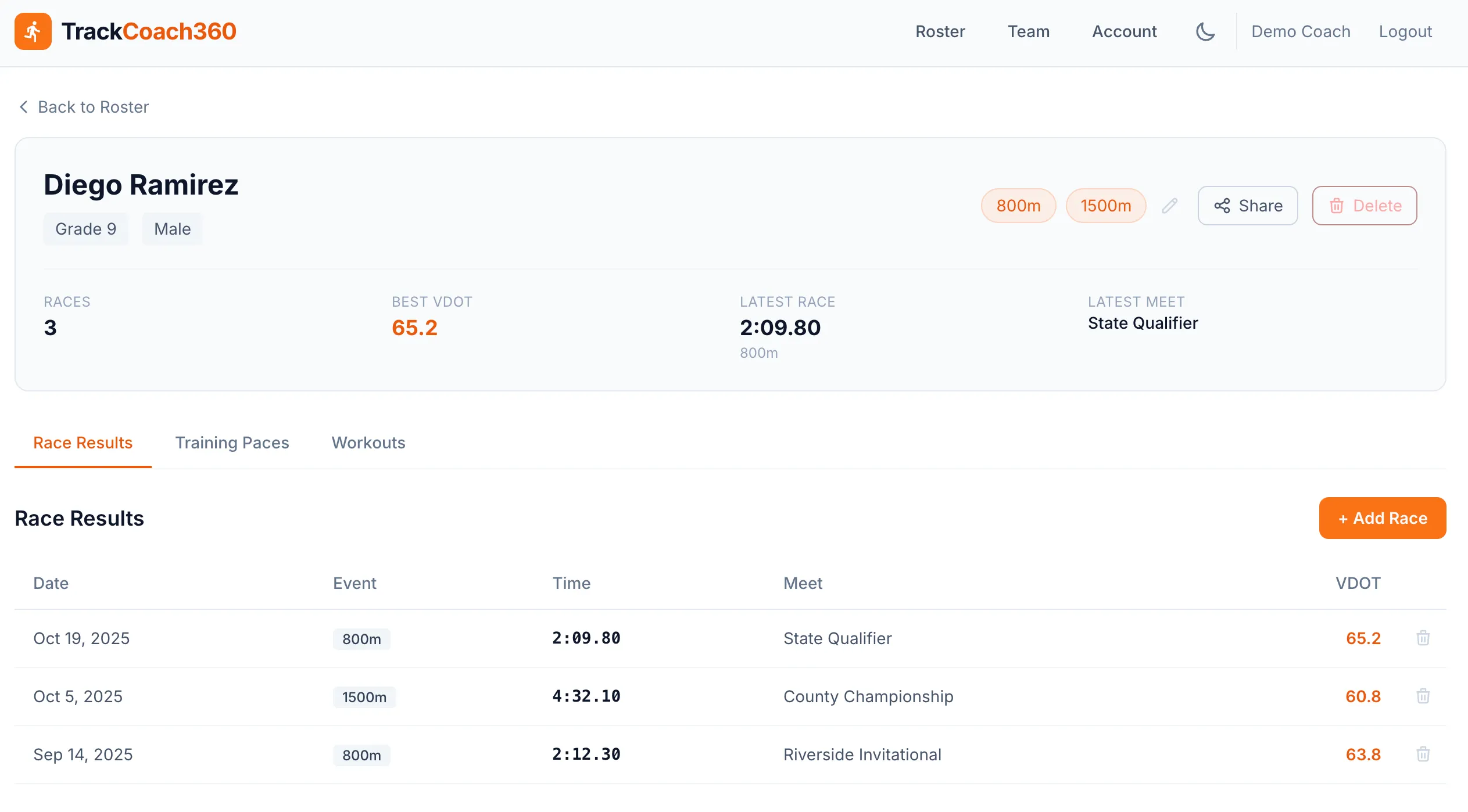
One Calculator, Your Entire Team
Free online pace calculators handle one runner at a time. TrackCoach360 holds the paces for your whole roster, side by side — so you can plan a practice where every group runs the right speed.
Individual by Design
Every athlete's zones come from their own VDOT. A freshman and your number-one runner each get paces that match their fitness.
Team Table View
See VDOT scores and paces for the whole squad in one table on the roster dashboard — perfect for planning practice groups.
Athletes See Their Paces
Share an athlete's page with one click — no login needed — so they know their zones before they lace up.
Simple Setup
Accurate Paces in Three Steps
Add Your Roster
Set up athlete profiles with grades and primary events on your team dashboard.
Log a Race Result
One result is all it takes. VDOT is calculated automatically from any of 8 distances, 400m–10,000m.
Train in the Right Zone
All six pace zones appear instantly, per mile and per 400m — and stay current all season.
FAQ
Training Pace Questions
What pace zones does the training pace calculator produce?
TrackCoach360 calculates six research-backed zones from every VDOT score: Easy (recovery and aerobic development), Marathon (sustained endurance), Threshold (lactate development), CV or Critical Velocity (the bridge between tempo and interval work), Interval (VO2max development), and Repetition (speed and neuromuscular work).
Are paces shown per mile or per 400m?
Both. Every zone shows the pace per mile and per 400m, so the same data works for a continuous road run and for a rep workout on the track where athletes need lap splits.
How are the training paces calculated?
Paces are derived from each athlete's VDOT score, which TrackCoach360 calculates automatically from logged race results using the Jack Daniels Running Formula. There's no manual data entry beyond logging the race itself. Curious how it works? Start with What is VDOT?
Do paces update when an athlete runs a new PR?
Yes. When you log a new race result, the athlete's VDOT is recalculated and all six pace zones update automatically. Athletes never train off stale numbers from earlier in the season.
Does every athlete get their own paces?
Yes. Each athlete's zones come from their own VDOT score, so a freshman and your top varsity runner each see paces that match their actual fitness. You can also compare paces across the team and group athletes with similar VDOT scores for workouts.
Give Every Athlete the Right Pace
Six zones, per mile and per 400m, kept current automatically. Set up your roster and see your team's paces today.
Free for 14 days · Cancel anytime