The VDOT Calculator for Coaches Who Run a Whole Roster
Log a race result, and TrackCoach360 instantly calculates the athlete's VDOT score using the Jack Daniels Running Formula — then turns it into training paces and race predictions. For every athlete on your team.
Free for 14 days · Cancel anytime
VDOT Happens Automatically. You Just Log the Race.
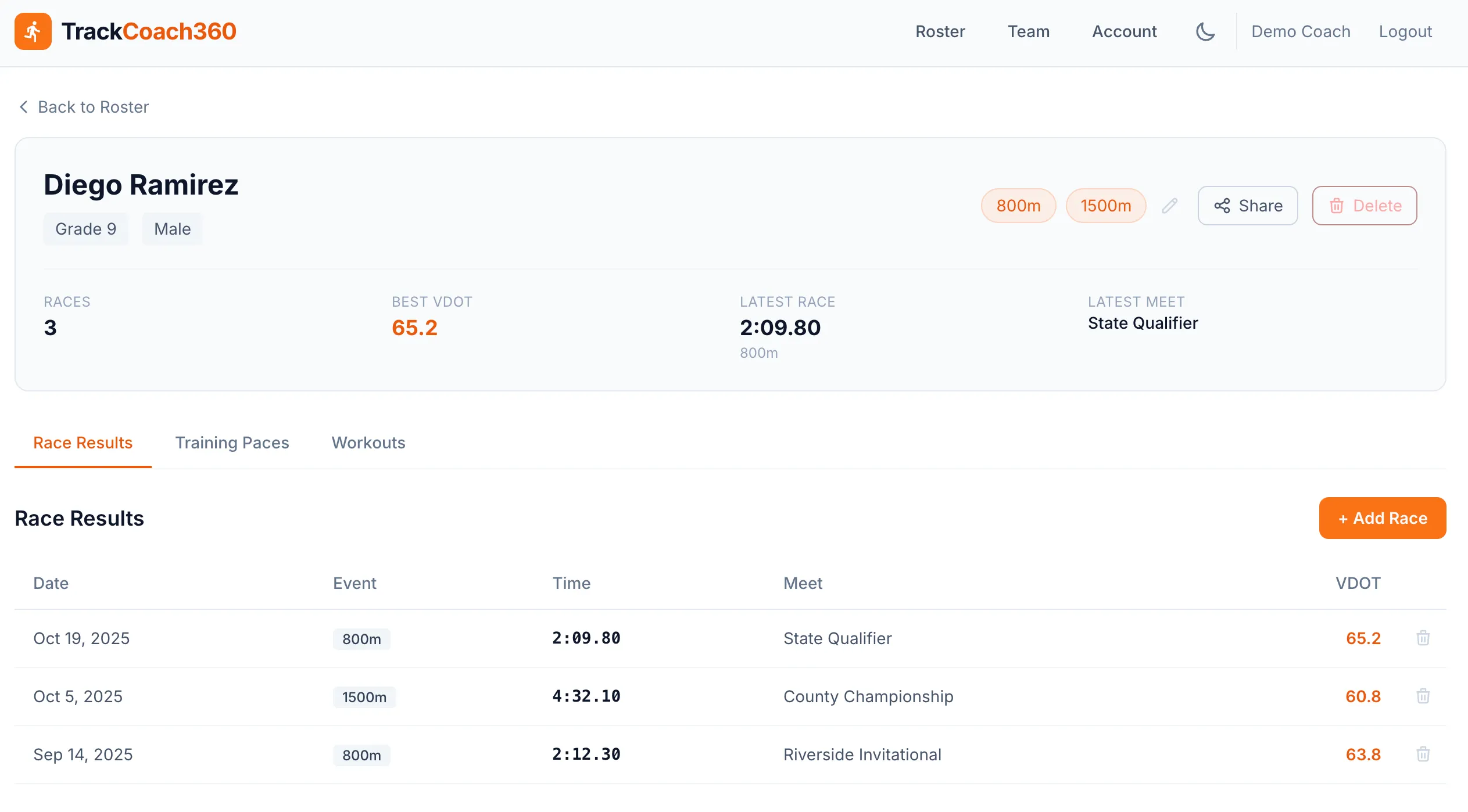
VDOT is the gold standard for measuring distance running fitness, but most coaches never use it because looking up tables for 30 athletes after every meet is a non-starter. TrackCoach360 removes that barrier entirely: enter a time and distance, and the VDOT score appears with the result.
- Powered by the Jack Daniels Running Formula — the same science behind elite distance programs
- Every result gets its own VDOT, so scores always reflect current fitness
- Training paces and race predictions update at the same moment — no extra steps
VDOT-Eligible Distances
Plus sprint and hurdle results tracked alongside — 13 events covered in total.
8 Race Distances, From the 400 to the 10K
Whether your athletes run the 800 in the spring or a 5K cross country course in the fall, TrackCoach360 calculates VDOT from 7 eligible distances spanning 800m through 10,000m. One score connects an athlete's fitness across every event and every season.
- Covers standard high school and college middle distance and distance events
- Works for both track and cross country — carry fitness data across seasons
- Compare athletes who race different events on a single, fair scale
New to the concept? Read our explainer: What is VDOT?
Why Coaches Shouldn't Hand-Calculate VDOT
The Daniels tables were written for a runner managing one fitness score — their own. A coach is managing dozens, and they all change after every meet. Doing that by hand means hours of table lookups, transcription into spreadsheets, and a fresh chance to make an error each time.
- It doesn't scale. A 30-athlete roster after a Saturday invitational is hours of lookups
- Errors compound. One wrong VDOT means weeks of wrong training paces for that athlete
- Spreadsheets go stale. When updating is painful, athletes end up training off old fitness data
- VDOT is only step one. You still have to convert it into six pace zones per athlete — TrackCoach360 does that automatically too
See how the score becomes a daily coaching tool with the training pace calculator.
Worked Example
From One Race Result to a Full Training Picture
Here's exactly what happens when you log a result for one of your milers after a Tuesday dual meet.
You log the result
Open the athlete's profile, choose the event (1600m), and enter the time from the meet. That's the only data entry required.
VDOT is calculated instantly
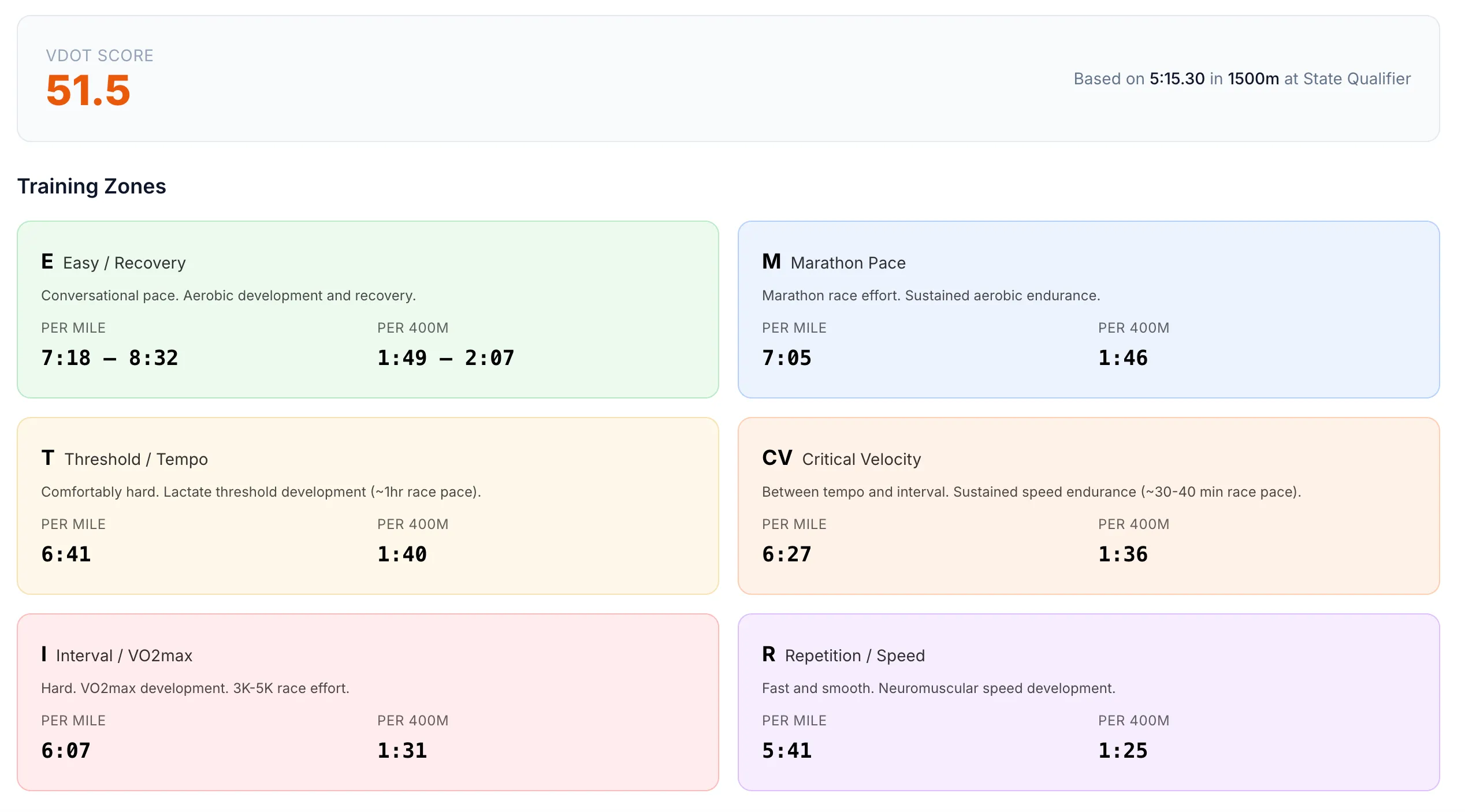
TrackCoach360 runs the time through the Jack Daniels Running Formula and attaches a VDOT score to the result — and to the athlete's profile as their current fitness marker.
Six pace zones appear
Easy, Marathon, Threshold, CV, Interval, and Repetition paces are generated from the new VDOT — each shown per mile and per 400m, ready to use at practice tomorrow.
Equivalent races are predicted
The same score projects what that 1600 performance is worth in the 800, 3200, 5K, and every other distance from 400m to 10K — useful for event selection and goal setting. Learn more in our guide to predicting race times.
Simple Setup
VDOT for Your Whole Team in Three Steps
Add Your Athletes
Build your roster with names, grades, and primary events. Takes minutes, not an afternoon.
Log a Race Result
Enter a time from any of the 7 VDOT-eligible distances. The VDOT score is calculated on the spot.
Coach Off the Numbers
Training paces, race predictions, and team comparisons are ready the moment the score lands.
FAQ
VDOT Calculator Questions
What is a VDOT score?
VDOT is a fitness score from the Jack Daniels Running Formula that represents an athlete's current running fitness based on a race performance. Because it accounts for both speed and the demands of each distance, two athletes with the same VDOT have comparable fitness even if they race different events. Coaches use it to set training paces and predict performances at other distances.
Which race distances does the VDOT calculator support?
TrackCoach360 calculates VDOT from 8 race distances, from the 400m up through 10,000m — covering the standard middle distance and distance events in high school and college track plus cross country racing distances.
Do I have to calculate VDOT manually?
No. You simply log a race result for an athlete and TrackCoach360 calculates the VDOT score automatically. Training paces and equivalent race predictions update at the same time, so there are no tables to look up and no spreadsheet formulas to maintain.
Does VDOT update as my athletes get fitter?
Yes. Every new race result you log gets its own VDOT calculation, so an athlete's score reflects their most recent fitness. Training paces update automatically as fitness changes, which means workouts always match where the athlete is right now — not where they were at the start of the season.
What about my sprinters and hurdlers?
TrackCoach360 tracks results for 13 events, including sprints and hurdles, so every athlete has a complete competitive record. VDOT itself is calculated for the 7 eligible distances from 800m through 10,000m, since the formula is designed for events with a meaningful aerobic component.
Is the VDOT calculator included in every plan?
Yes. Automatic VDOT calculation, training paces, and race predictions are included in both the Essentials plan ($9.99/mo) and the Complete plan ($19.99/mo). See pricing details — every plan starts with a 14-day free trial — you won't be charged until the trial ends.
Stop Looking Up VDOT Tables by Hand
Log your first race result and watch the VDOT score, six training paces, and race predictions appear — for every athlete on your roster.
Free for 14 days · Cancel anytime